NSCT Registration: How to Sign Up on the HEC Portal
You register for the NSCT on the HEC portal at nsct.hec.gov.pk: sign up with your CNIC, verify yourself with the last 2 digits of your university registration number, create a password, then upload a passport-size photo and choose your test city. Your registration only counts as complete after the photo and the test city are submitted, according to Virtual University's registration notice.
Registration is free and mandatory for eligible students. The steps below follow the official Student Guide published on the portal for the 2026 test.
Before you start
Have these ready so you can finish in one sitting:
- Your CNIC number. The portal uses it as your login ID. (If you have a B-Form instead, see the FAQ below.)
- Your university registration number. The portal asks for its last 2 digits to confirm you are on your university's list.
- Access to your student email. Password recovery goes to your registered student email address, per the portal's Student Guide.
- A passport-size photograph as a digital file.
- Your preferred test city.
The registration-number check works against student records supplied by universities (HEC's report counts 57,241 records uploaded). If the portal does not recognise you, the likely problem is your university's list, not you. Contact your university focal person.
Not sure you are eligible? HEC says all 7th and 8th semester students of computing programmes at HEC-recognised universities are covered. See NSCT Eligibility Criteria for the details.
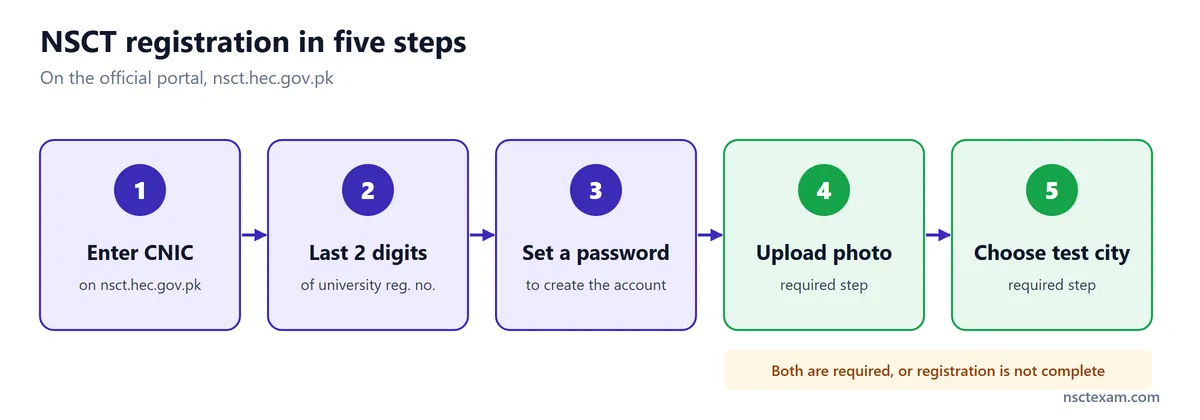
Step 1: Sign up with your CNIC
On the portal home page, choose Sign Up under "New Users". The Student Guide lists sign-up as three short steps:
- CNIC. Enter your CNIC number to get started.
- Registration number. Verify your information by entering the last 2 digits of your university registration number.
- Password. Create a password to complete sign-up.
Official source
"Verify your information by entering the last 2 digits of your University Registration Number." (NSCT Student Guide, nsct.hec.gov.pk)
Pick a password you will remember. You will need it again to complete registration and later to check your test details.
Step 2: Sign in
Once your account exists, choose Sign In under "Existing Users" and enter your CNIC and password. The Student Guide says existing users sign in "to access your profile and test details". If sign-in fails, our NSCT login and password reset guide covers the common fixes.
Signing up is not the same as being registered. Thousands of students in 2026 started sign-up but never finished. HEC's report counts 46,155 students who started sign-up against 40,784 who registered (HEC NSCT report).
Step 3: Upload your photo
After signing in, the Student Guide's "Complete Registration" screen asks you to review, verify and submit your information. VU's notice names the photo as one of the two steps that make registration complete:
Official source
"A student's registration will only be considered complete once the following steps are completed on the portal: Uploading a passport-size photograph, and Selecting the preferred test city." (VU, 12 March 2026)
The official pages we could reach do not publish photo size, format or background rules. As general advice, use a recent, front-facing photo with a plain background, because the same photo may be used to identify you at the centre. Follow any instructions shown on the upload screen itself.
Step 4: Choose your test city
The second required step is selecting your preferred test city. In 2026 the test ran at 165 centres in 112 cities (HEC, 6 April 2026), so most students can pick a city near their campus or home.
Choose the city you can actually reach on test day, not the one you happen to be in while registering. How a specific centre inside that city is assigned is not officially published. Our NSCT Test Centres and Test Cities page explains what is known.
Step 5: Check that you are complete
Before you log out, confirm that both the photo and the test city show as saved, then submit the form. Take a screenshot of the final screen for your records. If anything looks wrong, raise it with your focal person before the deadline, not after.
Forgot your password?
Use the Forgot Password option on the portal. The Student Guide says to enter your CNIC or B-Form number, and your password is sent to your registered student email address. If you no longer have access to that email, contact your focal person or the VU help desk.
Deadline and who to contact
The 2026 registration deadline was 20 March 2026 (VU notice). For the next sitting:
Important
HEC has not officially announced the NSCT 2027 registration dates yet. Check nsct.hec.gov.pk and your university's focal person. Our NSCT 2027 page will be updated when an official notice appears.
For problems with registration, scheduling or test conduct, the portal directs students to the VU help desk: nsct@vu.edu.pk, 042-99204760 or 042-99203899, and WhatsApp 03000656905, 03000656907 or 03000656908. VU students can also write to focalperson-nsct@vu.edu.pk (VU notice).
Why you should not skip registration
HEC states that registration and appearance are mandatory, and that universities which fail to facilitate registration are placed below the lowest performance category in national rankings (HEC, 4 March 2026). That is why your department may chase you about it. Registration costs nothing: see NSCT Fee.
What is not officially confirmed
- 2027 dates: not announced (see the warning above).
- Photo specifications: not published on the official pages we could reach.
- Whether a registration form can be filled offline: the official route is the online portal only. We found no official paper form.
FAQs
Is there an NSCT registration form I can download?
No official downloadable form has been published. Registration is an online process on nsct.hec.gov.pk: sign up with your CNIC, confirm the last 2 digits of your university registration number, set a password, then upload your photo and select your test city. Be wary of any site that asks you to fill a form or pay elsewhere, because HEC says the test is free.
Where is the NSCT registration online login?
Go to nsct.hec.gov.pk and choose Sign In under "Existing Users". Enter your CNIC and the password you created at sign-up. New students choose Sign Up instead. If you cannot sign in, use Forgot Password, which sends your password to your registered student email. Our login guide covers common errors step by step.
Why does the portal not recognise my CNIC?
The portal checks your details against the student records universities uploaded, and the last 2 digits of your registration number must match that record. If the portal rejects your details, contact your university's NSCT focal person first. They can check whether you were included in the upload and correct mistakes. The VU help desk is the next step.
Is my registration complete after sign-up?
No. VU's notice says registration is complete only after you upload a passport-size photograph and select your preferred test city. Signing up only creates your account. Log back in, finish both steps, submit, and check that they are saved before the deadline your university gives you.
Can I register through HEC directly?
The HEC registration route is the portal itself, nsct.hec.gov.pk. HEC's 4 March 2026 news release also tells eligible students to contact their university's focal person for timely completion of registration. There is no separate HEC office process for students published on the official pages.
What if I miss the registration deadline?
No official late-registration process was published for 2026. Contact your focal person and the VU help desk immediately, explain your situation in writing, and keep a copy. Because the test is mandatory, your university has a strong reason to help you resolve it.
Next step
Registered? Use the weeks before the test to practise. Start with free NSCT MCQs by subject, then time yourself on a full NSCT mock test. For the format, read NSCT Test Pattern Explained.